

NDA Notice:
This case study uses abstracted or representative examples to illustrate design approach and decision-making rather than proprietary systems or internal documentation. Public-facing work is shown for illustrative purposes only.
Role
Lead UX Designer
Product
Enterprise Design System
Timeframe
6 sprints
Collaborators:
Product Managers, Business Analysts, Developers, QA, Accessibility Vendor Partner
Tools:
Adobe XD, internal CMS, accessibility testing tools (VoiceOver, WebAIM Contrast Checker), WCAG documentation
The Module That Couldn’t Be Patched
Our enterprise design system was undergoing a full accessibility overhaul. Most modules needed targeted fixes. The video player was different. Over the years, it had accrued technical debt to the point where it lacked features most modern video players offer by default, let alone what was needed to meet WCAG compliance.
I was asked to lead the redesign of this module. The challenge wasn’t just design execution. It was understanding the system deeply enough to advocate for the right path forward, working across engineering, product, QA, and an external accessibility partner to get there.
The existing player had no keyboard navigation, no transcripts, no closed captioning, no playlist timestamps, and no “Now Playing” indicator — issues that went beyond accessibility and affected general usability for all users.
Finding the gaps before designing the solution

I began with a combined design discovery and heuristic analysis — mapping every place the existing player fell short, both from an accessibility standpoint and from basic usability best practices. This wasn’t just a compliance checklist. I wanted a holistic picture of what the experience should be.
The audit produced a prioritized list of features needed, each tied back to a specific accessibility issue or UX gap:
| Feature | Issue Addressed | WCAG Criterion |
|---|---|---|
| Keyboard Navigable Controls | Users who cannot operate a mouse have no way to play, pause, adjust volume, or seek through video content. | 2.1.1 Keyboard (A) |
| Keyboard Navigable Playlist | Playlist items are not reachable or operable via keyboard, preventing non-mouse users from selecting videos. | 2.1.1 Keyboard (A) |
| Selectable Playlist Items | Without focusable, activatable items, screen readers cannot identify or interact with playlist content meaningfully. |
2.1.1 Keyboard (A) 4.1.2 Name, Role, Value (A) |
| Closed Captioning | Deaf and hard-of-hearing users have no access to spoken audio content in any form. | 1.2.2 Captions — prerecorded (A) |
| Transcript Functionality | Users cannot read, search, or reference spoken content, affecting deaf users and those in noise-sensitive environments. | 1.2.3 Audio description or media alternative (A) |
| Autoplay Controls | Automatic media playback can disorient screen reader users and interfere with assistive technology audio output. |
1.4.2 Audio control (A) 2.2.2 Pause, stop, hide (A) |
| Now-Playing Indicator | Screen readers receive no signal about which video is currently active, making playlist navigation ambiguous. |
4.1.2 Name, Role, Value (A) 1.3.1 Info and relationships (A) |
| Playlist Timestamps | Users relying on screen readers have no way to gauge video duration before selecting, reducing content discoverability. | 1.3.1 Info and relationships (A) |
| Video Count | Assistive technology users have no context for how many items are in a playlist, making navigation unpredictable. |
1.3.1 Info and relationships (A) 2.4.6 Headings and labels (AA) |
WCAG 2.1 criteria shown. Level A = minimum compliance; Level AA = enhanced compliance and common legal standard.
Once I had the complete list, I brought it directly to our accessibility vendor partner. We went through each item together — I explained the specific issue I believed it addressed, and we confirmed which changes would genuinely move the needle on compliance. That external validation was essential before I could make a case to engineering and leadership.
When “patch it” isn’t an option
With a confirmed feature list in hand, I brought the proposal to the engineering lead and relevant stakeholders. I provided annotated examples of each change alongside context for how they’d address specific issues — making sure the ask was grounded and legible, not just visual.
The module had been built and updated incrementally for years. Making all the required changes without a full rebuild wasn’t feasible. A full rebuild meant a significant timeline delay — one that would threaten our end-of-year target for a compliant design system. Rather than stall, I went back to the engineering lead with a different question: which features could be implemented without a rebuild?
They identified four that were achievable in the existing codebase: keyboard navigation for controls and playlist, selectable playlist items, and transcript and closed captioning support. I returned to the accessibility vendor with this scoped list, and they confirmed it would achieve basic compliance — with full compliance following in a planned Phase 2.
By reframing the engineering limitation as a phased plan, we kept the project moving, protected the compliance goal, and created space for a proper rebuild without sacrificing momentum.
A plan the whole team could commit to
With alignment from engineering, the accessibility partner, and stakeholders, I proposed a two-phase structure that balanced delivery speed with design integrity.
Phase 1: MVP
Achievable without rebuild
2 SPRINTS
Basic compliance achieved, and shippable within existing sprint cadence.
- Keyboard navigable controls
- Playlist navigable controls
- Selectable playlist items
- Closed captioning and
- Transcript functionality
Phase 2: Full Rebuild
Complete feature set
4 SPRINTS
Full compliance and elevated experience for all users. New module build implementing all remaining features:
- Autoplay controls
- Playlist timestamps
- Video count,
- “Now Playing” indicators
- Full keyboard interaction model
Turning a feature list into an experience
Over the course of a week, I translated the feature requirements into a fully realized design — thinking through interaction states, edge cases, and how each new element would communicate meaning to both sighted users and screen reader users simultaneously.
The graphic below showcases the redesigned Phase 2 player. I designed the interaction states for keyboard users first, then confirmed they held up for mouse users — rather than the other way around.
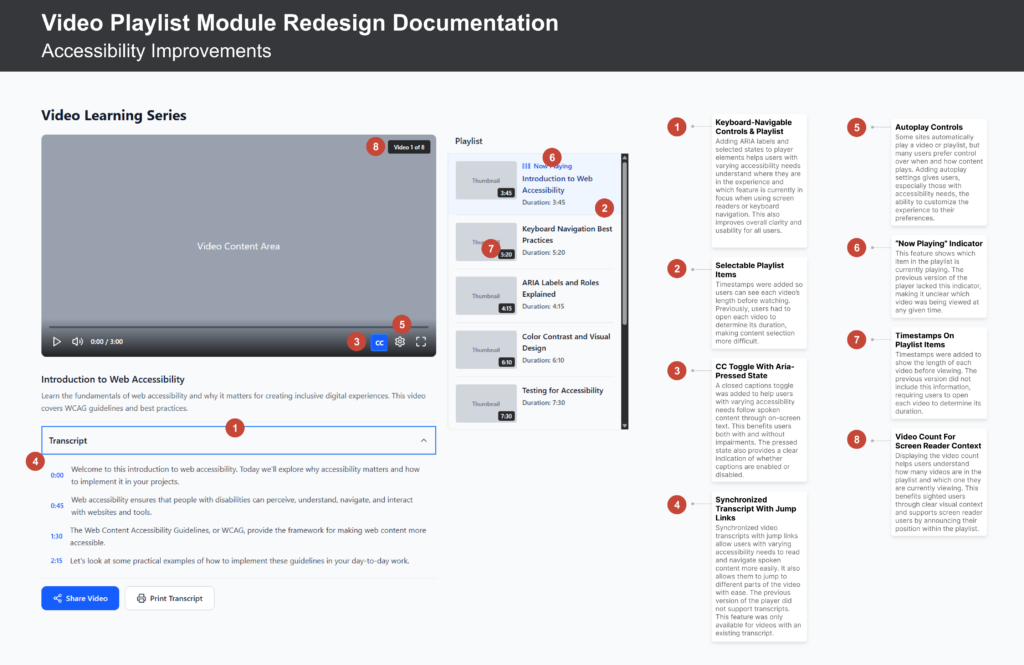
Final Feature List
- Keyboard-navigable controls & playlist
- Animated now-playing indicator
- Timestamps on all playlist items
- Synchronized transcript with jump links
- CC toggle with aria-pressed state
- Video count for screen reader context
- Incorporated aria-selected & aria-label on playlist items
I walked the team through the designs at the next sprint planning meeting. I covered interactions, states, and edge cases, and set up standing weekly office hours for any questions that surfaced during implementation.
Working Through Implementation
The most effective work didn’t happen in design files, it happened in real-time feedback loops during implementation. I stayed in daily contact through standups and messaging, reviewing builds in progress and catching issues before they became rework.
SPRINT 1–2
Phase 1 shipped
Keyboard navigation, selectable playlist, captions and transcripts implemented. Basic compliance achieved. QA completed collaboratively with the engineering team to verify against design specs and assistive technology behavior.
SPRINT 3–6
Phase 2 complete rebuild
Full module rebuild incorporating all remaining features. Consistent real-time communication meant no major issues arose during development — any questions were resolved the same day.
POST-RELEASE
Design system updated
Updated designs and documentation added to the system immediately post-release. As with all modules in this overhaul, I kept the source of truth aligned with what was publicly shipped throughout the project — not as a final step, but as an ongoing practice.
Compliance, craft, and a better experience for everyone
2
sprints to ship Phase 1 with basic compliance
9
new features designed & delivered across two phases
0
major issues during implementation — resolved in real time
The rebuilt module met full WCAG compliance, was added to the design system as a documented, maintained component, and perhaps just as importantly, became a model for how the team could approach phased delivery on complex, constrained projects.
The features added were no longer just checkbox compliance items, they made the module measurably better for every user.

What I’d carry into the next one
When engineering flagged that the existing player needed a full rebuild, that wasn’t a setback, it was a design input. Working within that constraint led to a phased structure that made sense for everyone involved. From there, the most consequential design work happened not in the files, but in conversations with the accessibility vendor, the engineering lead, and key stakeholders. Bringing annotated examples into those discussions, rather than relying on verbal descriptions alone, made alignment significantly faster and kept things moving.
The accessibility requirements that came out of those conversations turned out to make the player better across the board. Keyboard navigation, transcripts, now-playing indicators — every feature added for compliance also improved the experience for all users (sighted and non-disabled). The strongest case for accessible design isn’t what it fixes, but what it unlocks.